Join from home
Each location has a check-in link. The shop shares it, or puts the same address in a door QR code. It is one URL, not a separate kiosk app.
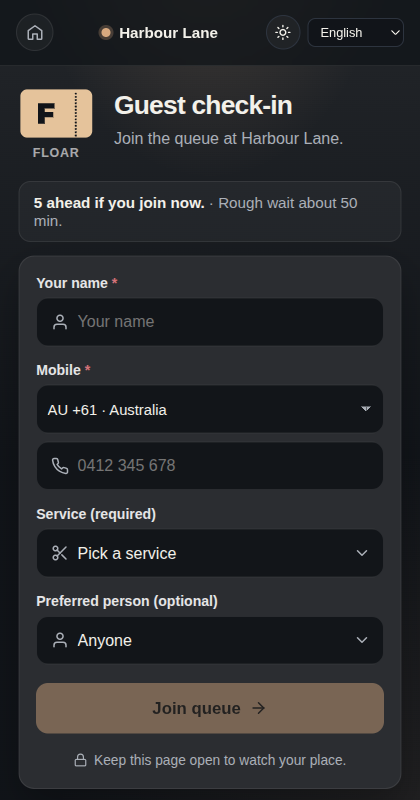
The guest sees how busy the shop is before they join. If they join, Floar gives them a ticket page for that visit: their place, how many people are ahead, a rough wait, and the staff name once they are called. The page asks them to keep it open.
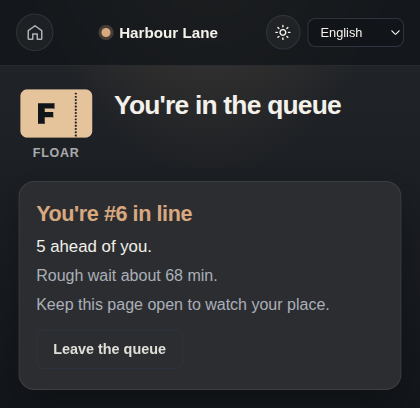
They can leave the queue. After they are marked done, they can rejoin for another visit.
The phone field starts in the location’s country and formats the number as they type. A traveller can switch country. Country names follow the language of the page. Floar stores the number in international form (E.164), for example +61… for Australia. If the location requires a mobile number, Join stays off until the number is complete for that country.
Service works the same way. If the shop requires a service, the label says required and Join stays off until one is chosen. If it is optional, the label says optional. An empty service list still lets a guest join.
The shop can close check-in. The link remains, and new joins stop until check-in opens again.
The same language control is on this page. The shop sets light or dark for check-in from the desk and from Settings, and that is what guests see. The button on this page can change this screen until the shop saves a different choice.