Staff and the clock
Staff belong to the account. Each person has a name, an email, the locations they work, a security group, and a PIN. The PIN is checked at sign-in. After that, the desk switches the working staff member by name, without asking for the PIN again. The order of those names follows the order set on the staff page.
A person can belong to more than one location. If their email matches more than one shop, sign-in asks which shop.
Deactivating a person hides that shop from their sign-in. Product-news opt-in starts on and can be turned off.
Security groups
Access is set for a group, not person by person. The groups are owner, manager, staff, and other.
The owner always has every action. That column cannot be turned off. Manager, staff, and other start from sensible defaults, and the owner can change those templates on the security page. Changing a person’s group is done on their staff row, and it saves immediately.
The actions are:
- Run the queue (take, done, cancel, walk-in).
- Open the check-in and board links.
- Use the clock.
- Close check-in.
- Open settings.
- Cancel everyone still waiting.
Cancelling everyone waiting is for an emergency, such as a power cut or the shop having to close. It asks for that person’s PIN and for the word CANCEL to be typed. People already being served are left as they are.
Defaults:
- Manager can do all of the above.
- Staff can run the queue, open the links, and use the clock.
- Other can open the links and use the clock.
A person who is already signed in keeps the access from that sign-in until they sign in again.
The clock
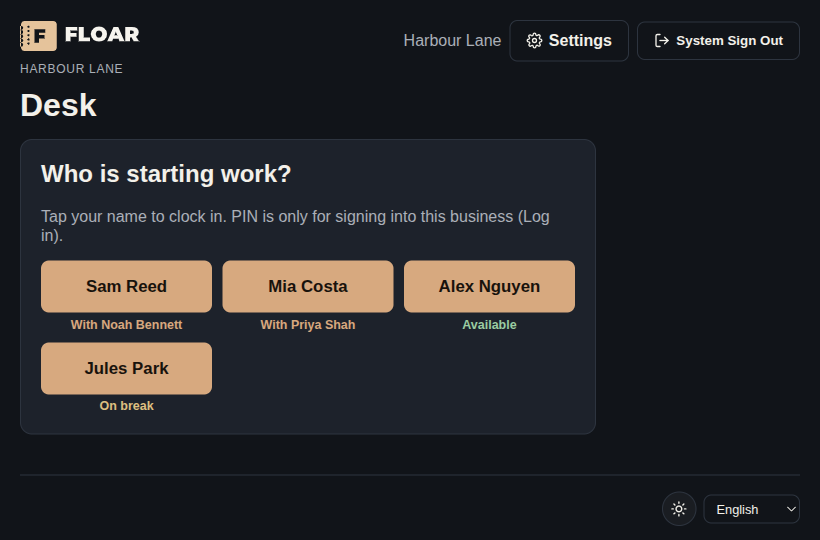
The desk shows one break control. It reads Take break while the person is available, and Break over while they are on a break. End shift clocks them out. Under the name, the status reads available, on break, or unavailable. When that person is with a guest, the name list says who they are with.
Clock punches are in, out, break start, and break end. The desk records them against the location and the staff name. Who is clocked in changes the wait estimate, because the estimate uses chairs that are actually working.
A staff phone app for clocking in and taking the next guest is later. The desk clock is the working path today.